Application Client Containers Explained
I often think about how invisible infrastructure shapes nearly everything people experience online. When users open a mobile application, access a web service, or interact with cloud software, they rarely see the complex systems running behind the scenes. Among the most influential of these systems is the application client container, a lightweight environment designed to host and execute application clients while maintaining isolation, portability, and reliability across different computing platforms.
At its simplest, an application client container is a runtime environment that packages an application client together with its dependencies so it can run consistently across systems. Developers use containers to ensure that applications behave the same way whether they run on a developer’s laptop, a testing server, or a global cloud platform. In modern distributed systems, these containers allow client components to interact seamlessly with servers, APIs, and databases while remaining isolated from the underlying operating system.
The rise of containers represents one of the most significant shifts in software architecture during the past two decades. As organizations moved toward cloud computing and microservices, traditional deployment models struggled to keep pace with the need for flexibility and scalability. Containers emerged as the solution, enabling developers to build applications that could be deployed rapidly across thousands of servers.
Today application client containers form a crucial layer within modern software ecosystems. From enterprise platforms to consumer applications, they allow software to operate reliably in environments that span data centers, cloud infrastructures, and personal devices. Understanding how these containers work reveals the architecture that powers much of today’s digital world.
The Origins of Containerized Applications
I often trace the origins of container technology back to earlier efforts to isolate applications within operating systems. During the late twentieth century, system administrators began experimenting with virtualization techniques that allowed multiple environments to run on a single physical machine.
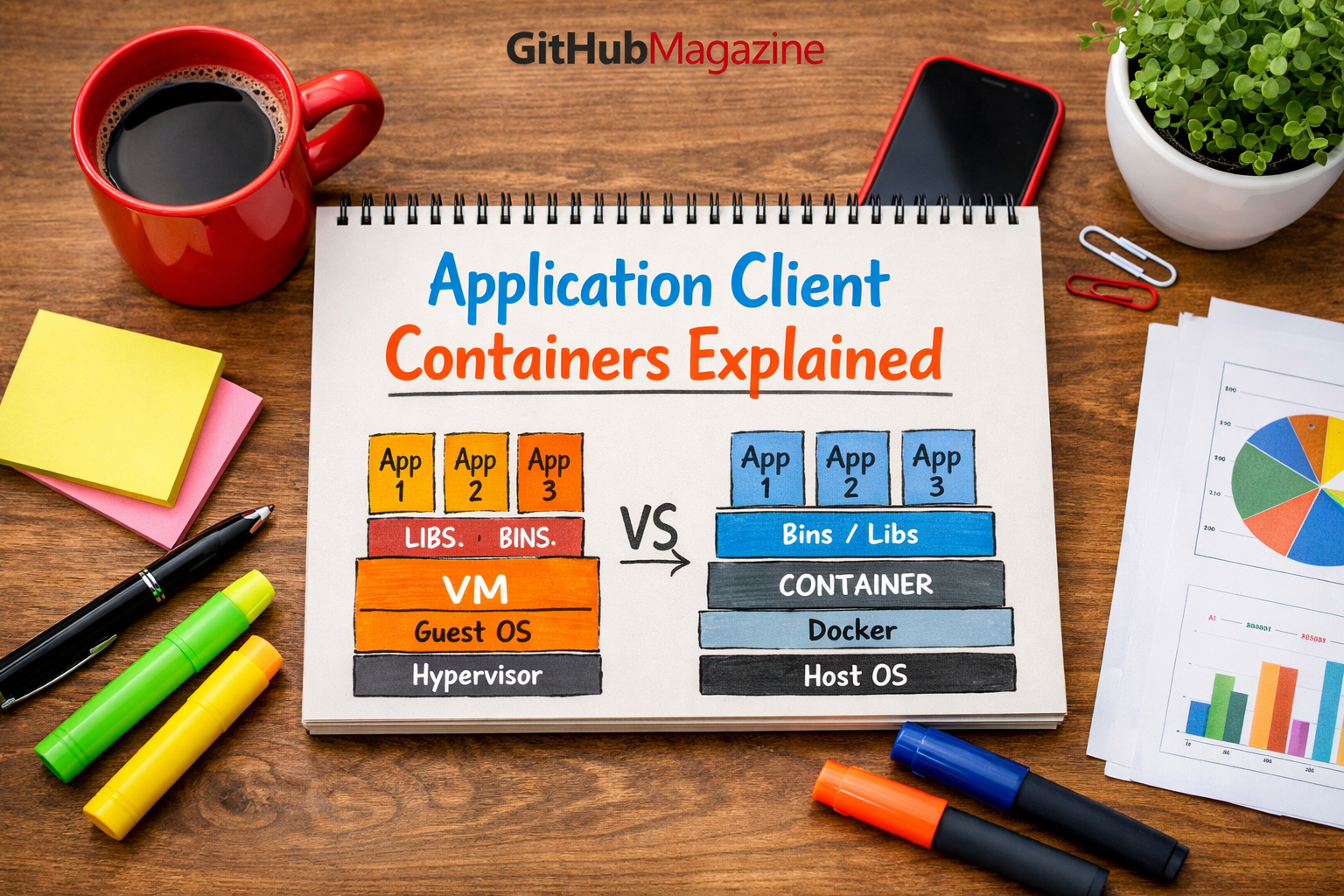
Traditional virtualization relied on virtual machines. Each virtual machine included its own operating system, libraries, and applications. While powerful, this approach required significant computing resources and added operational complexity.
Containers offered a different model. Instead of replicating entire operating systems, containers share the host system’s kernel while isolating applications within lightweight environments. This idea dramatically reduced overhead while maintaining separation between applications.
The concept gained significant momentum with the introduction of modern container platforms during the early 2010s. Docker, released in 2013, simplified container creation and distribution by providing standardized packaging tools. Soon afterward, orchestration platforms such as Kubernetes emerged to manage containerized workloads at large scale.
These innovations allowed developers to package application clients together with all necessary dependencies. As a result, software could run consistently regardless of the underlying infrastructure.
The container revolution transformed how developers build and deploy modern applications.
Understanding the Application Client Container
When I explain application client containers to new developers, I often describe them as portable application environments. Instead of installing software directly on a system, developers package the application client along with libraries, configuration files, and runtime dependencies into a container image.
When the container runs, it creates an isolated process environment that behaves consistently across different computing platforms.
| Component | Function | Role in Container |
|---|---|---|
| Container Image | Packaged application environment | Stores application and dependencies |
| Runtime Engine | Executes containers | Manages container processes |
| Host Operating System | Provides system kernel | Enables container execution |
| Application Client | User-facing software component | Performs application tasks |
This architecture ensures that applications behave predictably even when deployed across different servers, operating systems, or cloud environments.
Because containers share the host operating system kernel, they consume fewer resources than virtual machines. This efficiency allows organizations to run hundreds or even thousands of containers on a single server.
The result is a flexible deployment model that supports rapid scaling and continuous software delivery.
Containers and the Rise of Microservices
I often associate the growth of application client containers with the emergence of microservices architecture. In traditional monolithic applications, all components of an application were packaged together in a single system.
This design made updates difficult and slowed development cycles.
Microservices architecture introduced a different approach. Instead of building a single large application, developers divide systems into smaller services that communicate through APIs.
Application client containers provide the ideal environment for this model. Each microservice can run inside its own container, allowing teams to update, deploy, and scale services independently.
| Architecture Model | Deployment Style | Flexibility | Scalability |
|---|---|---|---|
| Monolithic Applications | Single large system | Low | Limited |
| Virtual Machine Services | Separate VMs per service | Moderate | Moderate |
| Containerized Microservices | Isolated containers | High | Very High |
| Serverless Systems | Event-based execution | Extremely High | Dynamic |
This shift transformed how large technology companies build platforms. By using containerized microservices, organizations can release updates frequently while maintaining system stability.
The approach has become a foundational pattern in cloud-native application development.
Portability and Consistency
One of the most important advantages of application client containers lies in portability. Software developers have long struggled with the problem known as “it works on my machine.”
An application that runs perfectly on a developer’s computer may fail when deployed to a production server because of differences in operating systems, libraries, or configurations.
Containers eliminate many of these inconsistencies by packaging the entire application environment within the container image.
Computer scientist Brendan Burns, one of the co-creators of Kubernetes, has often described containers as a standard unit of software deployment. By standardizing how applications are packaged and executed, containers enable consistent behavior across environments.
This portability allows organizations to move applications easily between development systems, testing environments, and production infrastructure.
As a result, containers play a central role in modern DevOps practices.
Security and Isolation
Security remains a critical consideration when running multiple applications on shared infrastructure. Application client containers provide isolation mechanisms that separate container processes from the host system and from other containers.
Each container operates within its own namespace and resource allocation boundaries. This separation prevents applications from interfering with each other.
Security researcher Dan Walsh has noted that container isolation mechanisms rely on operating system features such as namespaces and control groups. These features restrict how processes interact with system resources.
Although containers share the host kernel, additional security tools enhance isolation. Techniques such as image scanning, runtime monitoring, and access control policies help prevent vulnerabilities.
Organizations deploying containers at scale often combine these safeguards with orchestration platforms that enforce security policies across distributed systems.
Together, these measures allow containers to operate safely in complex multi-application environments.
Orchestration and Container Management
Running a single container is relatively simple. Managing thousands of containers across distributed infrastructure requires sophisticated orchestration tools.
Container orchestration platforms automate deployment, scaling, and resource allocation for containerized applications.
Kubernetes, originally developed by Google engineers, has become the dominant orchestration platform for modern cloud systems. It allows administrators to manage clusters of containers running across multiple servers.
| Orchestration Function | Purpose | Impact |
|---|---|---|
| Automated Deployment | Launch containers automatically | Faster releases |
| Load Balancing | Distribute traffic across services | Improved reliability |
| Auto Scaling | Adjust container numbers dynamically | Efficient resource use |
| Self Healing | Restart failed containers | Increased uptime |
These capabilities allow organizations to operate large distributed systems while maintaining reliability and efficiency.
Container orchestration represents one of the key technological foundations behind modern cloud infrastructure.
Application Client Containers in Enterprise Systems
Enterprise organizations increasingly rely on application client containers to support digital transformation initiatives. Containers allow companies to modernize legacy systems while integrating new cloud-native applications.
For example, organizations migrating traditional applications to the cloud often repackage client components as containers. This process simplifies deployment and enables integration with modern development pipelines.
Technology analyst Martin Fowler has described containers as a bridge between traditional enterprise systems and cloud-native architecture.
By isolating application components, containers enable incremental modernization. Companies can update specific services without rewriting entire systems.
This flexibility allows enterprises to adopt cloud technologies gradually while maintaining operational continuity.
As businesses continue shifting toward distributed systems, containerized client applications have become an essential architectural tool.
The Role of DevOps and Continuous Delivery
I often see application client containers closely linked with DevOps practices. DevOps emphasizes collaboration between development and operations teams, enabling rapid software delivery and continuous improvement.
Containers support these goals by providing consistent deployment environments. Developers can package applications into container images, which operations teams then deploy using automated pipelines.
This process reduces the risk of configuration mismatches between development and production environments.
DevOps expert Jez Humble has emphasized that reliable software delivery depends on repeatable deployment processes. Containers make such processes possible by ensuring that application environments remain consistent throughout the development lifecycle.
Continuous integration and continuous deployment pipelines frequently rely on container images as the standard unit of deployment.
As a result, containers have become a cornerstone of modern DevOps workflows.
The Future of Client Container Architecture
Looking ahead, I expect application client containers to remain central to software architecture as computing environments continue evolving.
Emerging technologies such as edge computing and distributed cloud platforms require flexible deployment models capable of running applications across diverse infrastructure environments.
Containers offer exactly that capability. Developers can deploy containerized client applications across data centers, cloud platforms, and edge devices while maintaining consistent behavior.
Industry experts predict that container technologies will continue evolving alongside orchestration tools and serverless computing models.
As computing infrastructure grows more distributed, the need for portable, lightweight application environments will only increase.
Application client containers represent a foundational element of that future.
Takeaways
- Application client containers package applications with dependencies into portable environments.
- Containers enable consistent software behavior across development, testing, and production systems.
- Microservices architectures rely heavily on containerized application components.
- Container orchestration platforms manage large distributed container environments.
- Security features isolate containers from each other and from host systems.
- Containers support DevOps practices and continuous software delivery.
- Modern cloud infrastructure depends heavily on containerized applications.
Conclusion
When I step back and consider how modern software systems operate, application client containers appear less like a single technology and more like an architectural shift.
They changed the way developers build, package, and deploy applications. By creating lightweight, portable environments, containers removed many of the barriers that once slowed software development and deployment.
Today organizations rely on containers to support distributed systems that span continents. Applications run in data centers, public clouds, and edge networks while maintaining consistent behavior.
This flexibility enables rapid innovation while preserving system reliability.
Yet containers are not simply tools for developers. They represent a broader transformation in computing philosophy. Instead of tightly coupling software to specific hardware or environments, modern architecture treats applications as portable units that can run anywhere.
As technology continues evolving, application client containers will remain a key building block in the infrastructure that powers the digital world.
FAQs
What is an application client container
An application client container is a lightweight environment that packages an application client and its dependencies so it can run consistently across computing environments.
How are containers different from virtual machines
Containers share the host operating system kernel, making them more lightweight and efficient than virtual machines which require separate operating systems.
Why are containers important for cloud computing
Containers enable portable, scalable application deployment across distributed infrastructure used by cloud platforms.
What tools manage application client containers
Container orchestration platforms such as Kubernetes manage deployment, scaling, and networking for large container environments.
Are containers secure for enterprise systems
Containers include isolation mechanisms and security policies that protect applications when combined with proper configuration and monitoring.

Related Posts

JNESE Meaning and Academic Context

Koalas Habitat History and Conservation Review