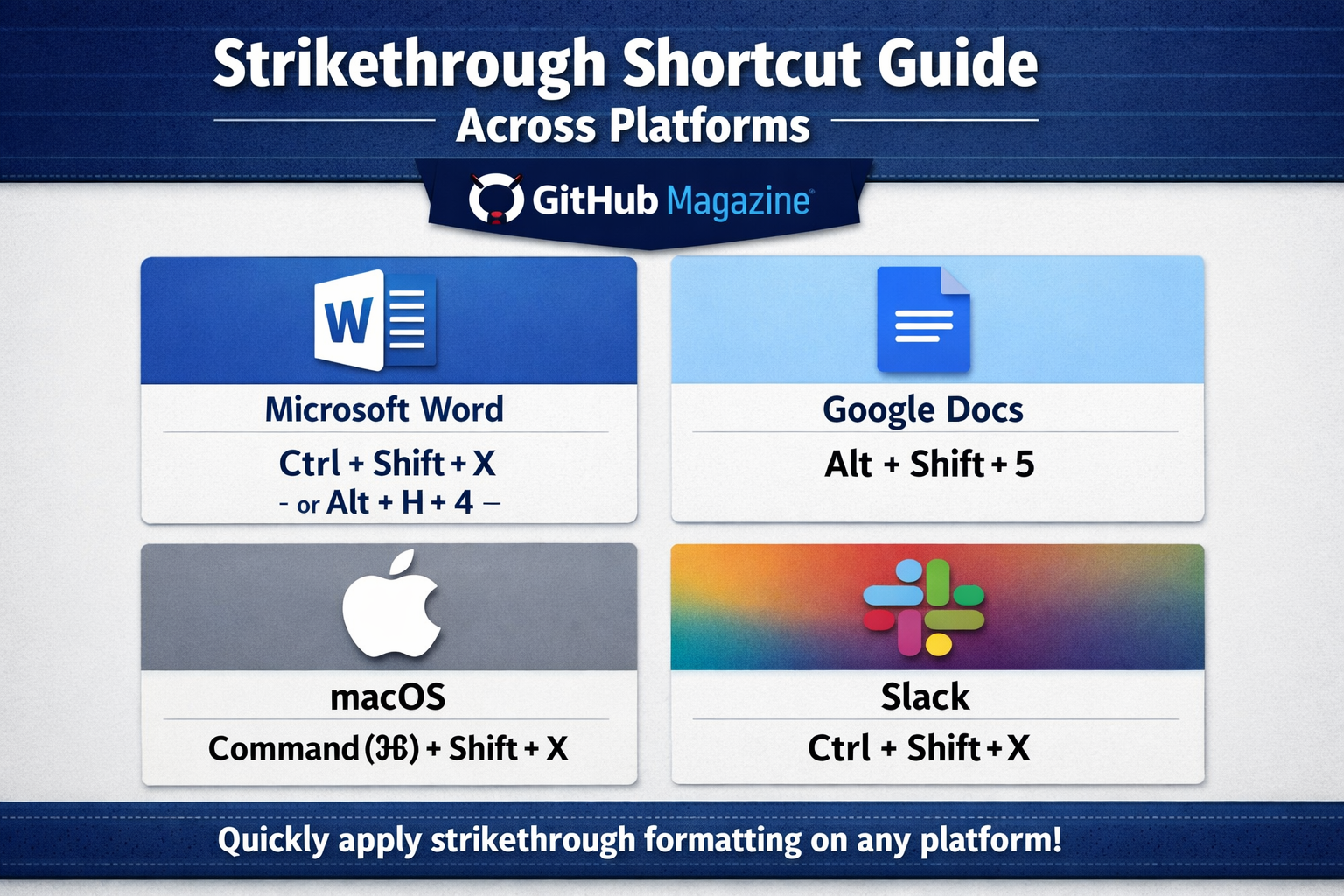
Strikethrough Shortcut Guide Across Platforms
I often notice that the smallest tools we use every day quietly shape how we think. The strikethrough shortcut is one of those tools. At its simplest, it allows users to cross out text without deleting it. On Windows, it may be Alt + H + 4 or Ctrl + Shift + X depending on the application. On macOS, it is commonly Command + Shift + X. That is the direct answer most people are looking for.
Yet the shortcut is more than a convenience. It represents a deeper shift in how writing works in the digital age. Instead of erasing ideas, we preserve them. Instead of hiding revisions, we display them. Strikethrough becomes a visible trace of thought.
This small formatting feature bridges past and present. It connects traditional editorial marks with modern digital workflows. It also adds a layer of meaning to communication, allowing writers to show hesitation, humor, or correction without removing words entirely.
Understanding the strikethrough shortcut means understanding how writing has evolved. It reflects how people collaborate, revise, and express themselves in a world where text is constantly changing but rarely disappears completely.
The Origins of Strikethrough in Print Culture
I like to think of strikethrough as a habit inherited from paper. Before digital tools existed, editors relied on physical marks to indicate changes. Crossing out words with a line was one of the most straightforward methods. It kept the original text visible while signaling that it should no longer be used.
This practice served an important purpose. It preserved the history of a document. Writers and editors could see what had been changed and why. The process of revision became part of the text itself rather than something hidden behind it.
When word processors emerged in the late twentieth century, they adopted many of these editorial conventions. Strikethrough was included as a formatting option, carrying forward a tradition that had existed for centuries.
Typographic experts have long emphasized that such marks are not merely functional. They represent the process of thinking and refining ideas. Even today, when everything can be deleted instantly, the choice to cross something out instead reflects a deliberate decision to keep the past visible.
The Shortcut Itself: A Cross-Platform Comparison
I have learned that while the idea of strikethrough is universal, the way to activate it depends on the platform. Each system reflects its own design philosophy and user expectations.
| Platform/Application | Shortcut | Notes |
|---|---|---|
| Microsoft Word (Windows) | Alt + H + 4 | Ribbon-based command sequence |
| Microsoft Word (Mac) | Command + Shift + X | Direct shortcut |
| Google Docs (Windows) | Alt + Shift + 5 | Browser-based formatting |
| Google Docs (Mac) | Command + Shift + X | Consistent with Mac conventions |
| Excel (Windows) | Ctrl + 5 | Numeric shortcut for formatting |
| Notion | Ctrl/Command + Shift + S | App-specific design |
These differences are intentional. Some systems favor step-by-step commands, while others prioritize speed and simplicity. What matters most is consistency within each environment, allowing users to build habits that feel natural over time.
Why Strikethrough Matters in Modern Writing
I see strikethrough as more than a formatting choice. It has become a tool for expression. In everyday writing, it signals revision. In digital communication, it can signal tone.
People use it to show edits without removing context. They use it to express humor or irony. They use it to emphasize what has changed. Each use adds another layer of meaning to the text.
A sentence that is crossed out but still readable invites the reader to engage differently. It suggests that something has been reconsidered. It can even create a sense of honesty, as if the writer is revealing their thought process.
Linguistic research into digital communication suggests that formatting now carries emotional weight. Strikethrough is part of that shift, functioning almost like a visual cue for how a sentence should be interpreted.
The Psychology of Crossing Things Out
I find it interesting that crossing something out feels different from deleting it. When text is deleted, it disappears completely. When it is struck through, it remains present but altered.
This difference has psychological implications. Visible edits can help people understand how ideas evolve. They provide context for decisions and make the process of revision more transparent.
In learning environments, this approach is especially valuable. Students who cross out mistakes rather than erase them can reflect on their thinking. They can see how their understanding has changed over time.
Writers benefit from this as well. Keeping earlier versions visible can lead to better decisions and more thoughtful revisions. It reinforces the idea that writing is not about getting everything right the first time, but about refining ideas gradually.
A Tool for Collaboration in the Digital Age
I have noticed that strikethrough becomes even more important when people work together. In shared documents, it helps maintain clarity. Instead of removing text immediately, contributors can mark it as no longer needed while still allowing others to review it.
| Use Case | Benefit | Example |
|---|---|---|
| Team editing | Transparency | Showing removed ideas in drafts |
| Academic writing | Revision history | Tracking thesis changes |
| Project management | Task updates | Marking completed items |
| Legal documents | Precision | Indicating removed clauses |
This approach reduces confusion. Everyone involved can see what has changed and why. It creates a shared understanding of the document’s evolution.
In professional settings, this level of transparency is essential. It ensures that decisions are documented and that no important information is lost too early in the process.
Expert Perspectives on Digital Editing
I often reflect on how experts describe small tools like this. Linguists and designers alike emphasize that visible edits carry meaning. They signal intention and help readers interpret text more accurately.
One perspective highlights strikethrough as a cognitive marker. It shows that something has changed while preserving its original context. Another viewpoint focuses on design, noting that good tools make actions visible and understandable.
There is also a broader observation from software development. Small features can have a large impact on how people interact with technology. The strikethrough shortcut is a clear example of this idea in practice.
Strikethrough in Coding and Technical Contexts
I have also seen strikethrough used in technical environments, particularly in documentation. In Markdown, it is created using double tildes, which makes it easy to apply across platforms.
In this context, it often indicates outdated or replaced information. Instead of removing content entirely, developers keep it visible for reference. This approach aligns with the principles of version control, where every change is tracked.
The presence of crossed-out text becomes part of the record. It shows how a system or piece of code has evolved over time. This transparency is valuable in complex projects where understanding past decisions can inform future ones.
Cultural Evolution: From Editing Mark to Expression
I find it fascinating how strikethrough has moved beyond its original purpose. In online communication, it is often used creatively. Writers use it to present one idea and then reveal another, creating a layered effect.
This style can be humorous, ironic, or reflective. It allows multiple thoughts to exist in the same sentence. It mirrors the way people think, where ideas are often revised even as they are being expressed.
Digital language continues to evolve, and formatting plays a significant role in that evolution. Strikethrough is no longer just an editing tool. It is part of how people communicate meaning in subtle and nuanced ways.
Takeaways
- The strikethrough shortcut differs across platforms but serves the same core function
- It originated in traditional editing practices and transitioned into digital tools
- It preserves text while indicating change, making revisions visible
- It enhances collaboration by improving transparency in shared documents
- It carries psychological value by revealing thought processes
- It has evolved into a tool for humor, irony, and layered expression
Conclusion
I keep coming back to how such a simple feature can hold so much significance. The strikethrough shortcut is not just about crossing out words. It is about acknowledging them while moving forward.
In digital writing, where changes happen constantly, this tool provides a way to keep track of ideas without losing them. It reflects a balance between clarity and complexity. It allows writers to show their work, not just present the final result.
As communication continues to evolve, tools like this will remain essential. They shape how we write, how we collaborate, and how we express ourselves. The strikethrough shortcut, in its quiet and understated way, captures the essence of modern writing.
FAQs
What is the strikethrough shortcut on most devices?
It depends on the platform. Common shortcuts include Ctrl + Shift + X on Windows and Command + Shift + X on macOS.
How do I use strikethrough in Google Docs?
Use Alt + Shift + 5 on Windows or Command + Shift + X on Mac to apply strikethrough formatting.
Why is strikethrough useful?
It keeps text visible while marking it as removed or changed, which helps with editing and communication.
Is strikethrough used outside writing?
Yes, it is used in coding, documentation, and even task management to show completed or outdated items.
Can strikethrough change the meaning of text?
Yes, especially in digital communication, it can add tone, humor, or irony to a sentence.

Related Posts
Best Programming Languages to Learn in 2026
Why Your Computer Says System Repairing Itself