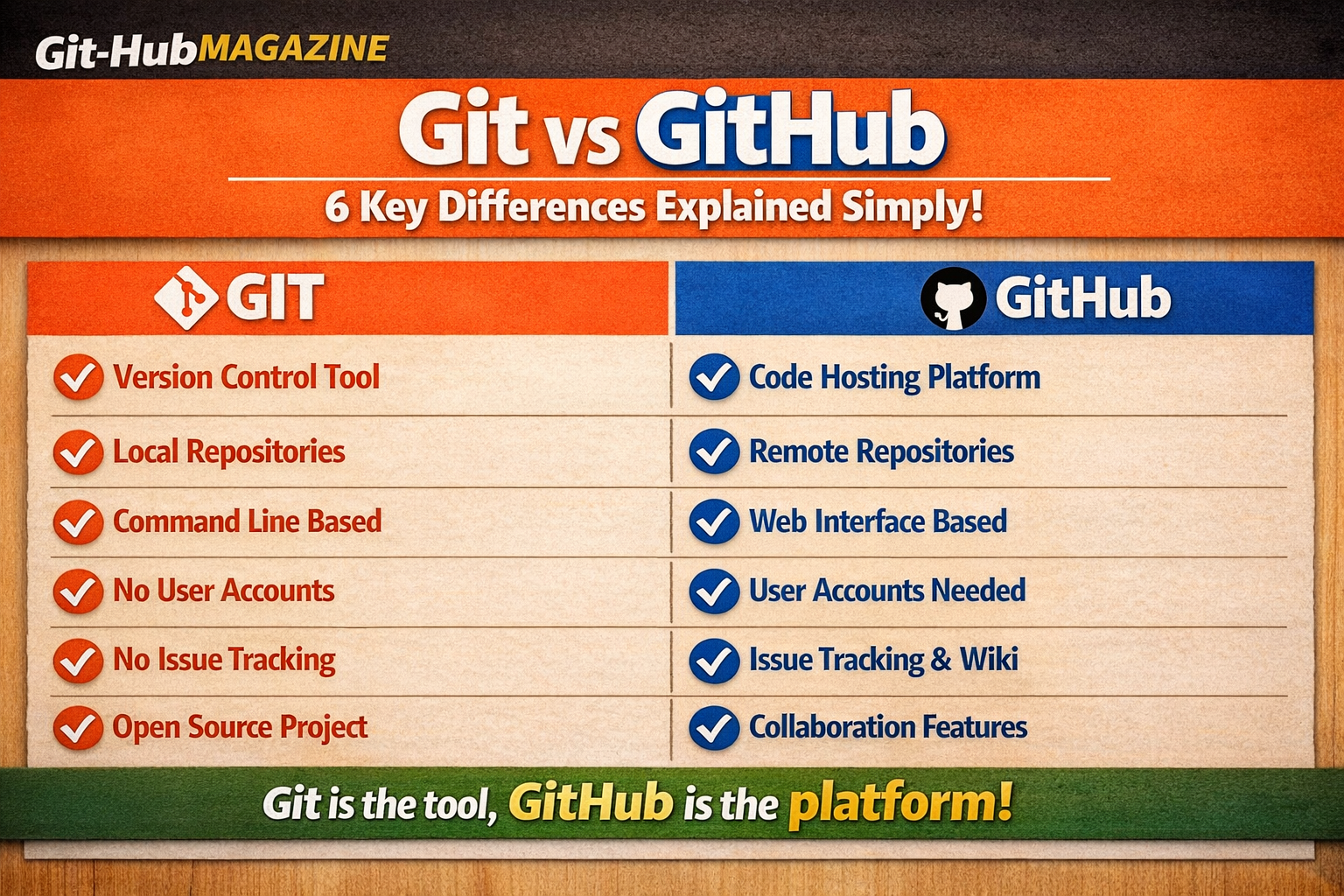
Git vs GitHub: 6 Key Differences Explained Simply (2026)
If you have ever searched for anything related to version control or coding, you have almost certainly seen both names — Git and GitHub — used in the same sentence, often interchangeably. I did the same thing when I first started learning. I assumed they were basically the same product with slightly different names.
They are not. Git and GitHub are two completely different things that happen to work very well together. Confusing them is like confusing Microsoft Word with Google Drive — one is a tool, the other is a place to store what you create with that tool.
In this article I will break down exactly what makes Git and GitHub different, using plain language and real examples. By the end, you will never mix them up again.
The Quick One-Line Answer
| Git | A free, open-source version control software you install on your computer. |
| GitHub | A cloud-based website and platform that hosts your Git repositories online. |
Now let us go deeper. Here are the six key differences that matter most for beginners.
Difference 1: Software vs Platform
| GIT | GITHUB |
| Git is a software application. You download it and install it directly on your computer — Windows, Mac, or Linux. Once installed, it runs locally on your machine. No internet connection required. | GitHub is a web platform — a website with features built on top of Git. You access it through your browser at github.com. It requires an internet connection and an account to use. |
The best analogy here is Microsoft Word vs Google Docs. Word is software installed on your machine. Google Docs is a platform you access online. Git is the Word. GitHub is the Google Docs.
Difference 2: Local vs Cloud
| GIT | GITHUB |
| Git stores everything on your computer. Your code history, branches, commits — all of it lives in a hidden folder called .git inside your project directory. Nothing leaves your machine unless you tell it to. | GitHub stores your code in the cloud on Microsoft’s servers (GitHub was acquired by Microsoft in 2018). This means your code is accessible from any device with internet access, and it is backed up even if your laptop breaks. |
This is why developers use both together. You work locally with Git, then push your changes to GitHub as a backup and for sharing with others. Git without GitHub is a local tool. GitHub without Git is an empty storage platform.
Difference 3: Works Offline vs Requires Internet
| GIT | GITHUB |
| Git works completely offline. You can create commits, switch branches, view your history, and roll back changes with no internet connection at all. This is useful when you are traveling, on a plane, or in a place with bad connectivity. | GitHub requires an internet connection for almost everything — viewing repos, pushing code, opening pull requests, reviewing code. Without internet, github.com simply does not load. |
In practice this means: if your internet goes down mid-project, you can still keep working and committing with Git. You just push everything to GitHub once your connection comes back.
Difference 4: Solo Tool vs Collaboration Platform
| GIT | GITHUB |
| Git on its own is primarily a solo tool. It tracks your changes and helps you manage your own project history. You can use Git on a project you never share with anyone, and it is still completely useful. | GitHub was built for collaboration. Features like pull requests, code reviews, issue tracking, project boards, wikis, and team permissions all exist to help multiple people work on the same codebase without chaos. |
This is probably the biggest practical difference. If you are working alone on a side project, Git alone could technically be enough. The moment you want to work with another developer — or want anyone else to see your work — you need GitHub (or a similar platform like GitLab or Bitbucket).
Difference 5: Command Line vs Visual Interface
| GIT | GITHUB |
| Git is primarily a command-line tool. You type commands like git add, git commit, git push into a terminal window. There is no graphical interface built into Git itself — it is all text commands. | GitHub provides a rich visual interface through its website. You can see your files, browse commit history, compare code changes, manage teams, and do almost everything through point-and-click without touching a terminal. |
That said, this difference has blurred over time. GitHub Desktop is a free app that gives you a visual interface for Git operations. And tools like VS Code have Git integration built in. But at their core, Git is CLI-first while GitHub is GUI-first.
Pro Tip: You do not need to master the command line before using GitHub. Start with GitHub’s website and GitHub Desktop, then learn Git commands gradually as you get comfortable.
Difference 6: Free and Open Source vs Freemium
| GIT | GITHUB |
| Git is completely free and open source. It always has been and always will be — it was created by Linus Torvalds (the creator of Linux) in 2005 and released under the GNU General Public License. No subscriptions, no limits. | GitHub has a free tier that is genuinely useful, but also paid plans. GitHub Free gives you unlimited public and private repositories. GitHub Pro ($4/month), Team ($4/user/month), and Enterprise plans add features like more CI/CD minutes, advanced security, and team management tools. |
For individual developers and students, GitHub Free is enough for almost everything. The paid plans become relevant when you are working in a professional team environment and need advanced collaboration or security features.
Complete Comparison Table
| Feature | Git | GitHub |
| Type | Software (CLI tool) | Web platform |
| Where it runs | Your local computer | Cloud (Microsoft servers) |
| Internet needed | No | Yes |
| Made by | Linus Torvalds (2005) | Tom Preston-Werner (2008) |
| Owned by | Open source community | Microsoft (since 2018) |
| Primary use | Version control | Code hosting + collaboration |
| Interface | Command line | Website + GUI |
| Cost | Free forever | Free + paid plans |
| Works offline | Yes, fully | No |
| Collaboration | Limited (local) | Full team features |
Do You Need Both Git and GitHub?
For most developers — yes. Here is why:
- Git alone is useful if you want to track changes on a personal project that never leaves your machine. But you lose the backup, visibility, and collaboration benefits.
- GitHub alone without understanding Git is frustrating. You will struggle to understand what commits, branches, and pull requests actually mean because they are all Git concepts.
- Git and GitHub together is the standard. You use Git commands to manage your code locally, then push to GitHub for backup, sharing, and collaboration. This is how 99% of developers work.
Pro Tip: Learn Git basics first — just five commands will get you started: git init, git add, git commit, git push, git pull. Then GitHub will make immediate sense.
GitHub Is Not the Only Option
GitHub is by far the most popular platform for hosting Git repositories, but it is not the only one. There are real alternatives worth knowing about:
- GitLab: A strong GitHub alternative that can be self-hosted. Very popular in enterprise environments that want to keep code on their own servers.
- Bitbucket: Made by Atlassian (the company behind Jira). Works well if your team already uses Atlassian products.
- Azure DevOps: Microsoft’s own platform, popular in enterprise Windows and .NET environments.
All of these platforms work with Git. The tool (Git) and the platform (wherever you host) are always separate — that is exactly the point of this article.
Frequently Asked Questions
Can I use GitHub without knowing Git?
Technically yes — you can upload files directly through GitHub’s website without any Git knowledge. But this severely limits what you can do. Understanding basic Git commands unlocks the full power of GitHub. Spend one afternoon learning the basics and it will be worth it.
Is Git only for code?
No. Git can track any text-based files — documentation, configuration files, markdown notes, even novels. It is primarily used for code because that is where version control matters most, but it is not limited to code.
Who created Git?
Linus Torvalds, the creator of the Linux operating system, built Git in 2005. He built it in just two weeks because he was frustrated with the version control tools available at the time.
Is GitHub owned by Microsoft?
Yes. Microsoft acquired GitHub in June 2018 for $7.5 billion in stock. GitHub continues to operate largely independently, and the free tier remains very generous.
What is the best way to learn Git?
The official Git documentation is excellent but dense for beginners. A better starting point is GitHub’s own learning platform at skills.github.com, which has interactive courses that teach both Git and GitHub together through real exercises.

Related Posts
How ChatGPT Works Step by Step

Host Website on GitHub Pages Free Guide